Wander Yak Licensed product
Tourism booking platform · by Shahrukh Sheikh
Tourism · PHP 8 · MySQL · Razorpay · Live at thewanderyak.com
A travel website that takes the booking, not just the enquiry.
Wander Yak is a booking platform for a tour operator in Spiti Valley. A traveler picks a trip, a pickup city, a stay category and a departure date, pays a token online and gets a confirmation. The operator runs trips, stays, campaigns, bookings and customers from one admin panel. It is built once and licensed to businesses, not rebuilt per client.
Live · Group departures, custom tours and volunteer campaigns · PDF brochures · Admin panel with roles
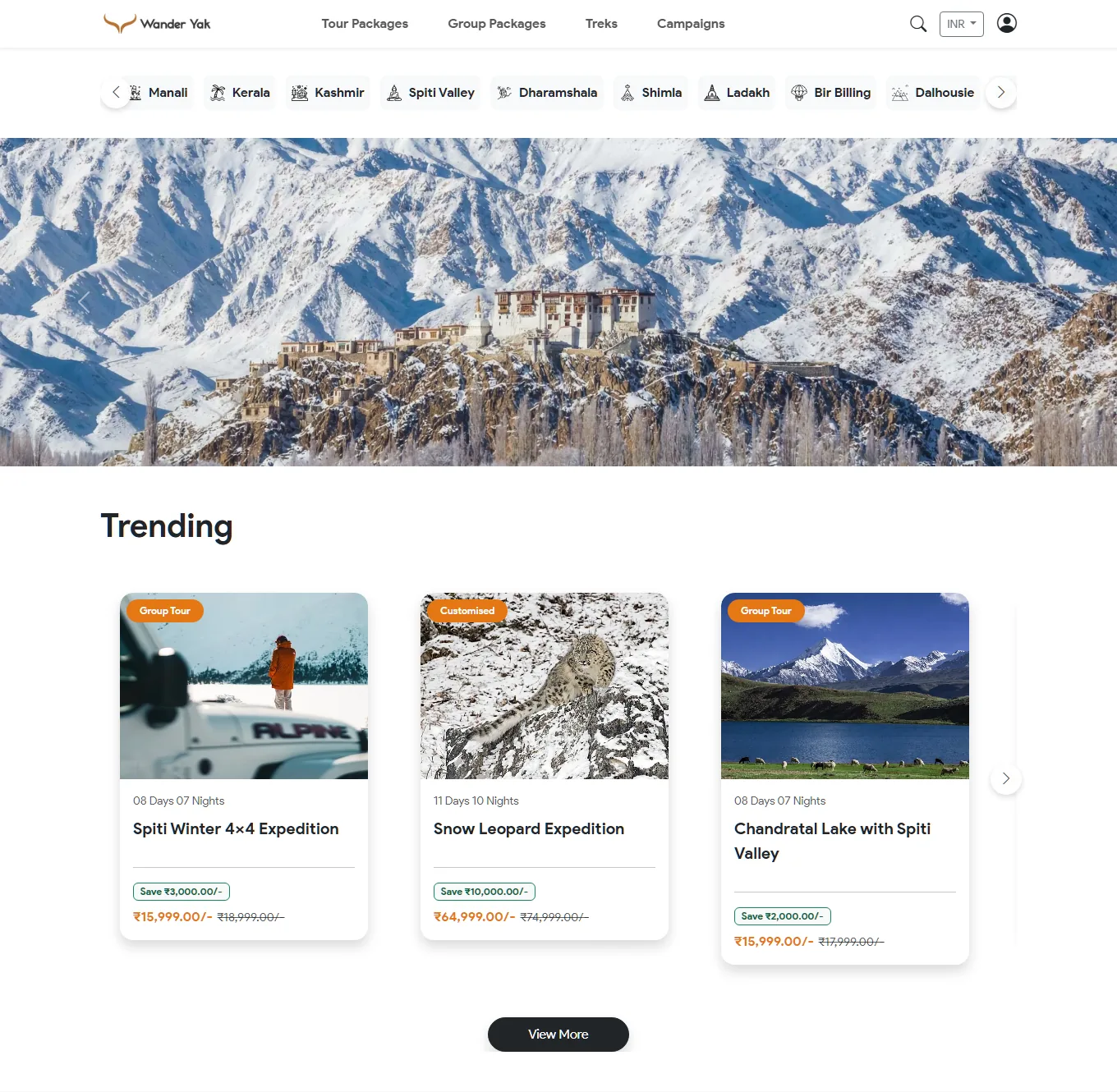
At a glance
Wander Yak in numbers
3
Ways to travel
Fixed-date group departures, custom tour packages and volunteer-style campaigns, each with its own flow.
20%
Token to hold a seat
Paid online with Razorpay, plus 5% GST on that token. The server works out every amount, never the browser.
41
Database tables
Trips, stays, itineraries, bookings, customers, campaigns, roles and more, with dozens of admin screens on top.
1
Licence, no resale
Use it for your own business, modify it, never resell it. Three months of free fixes on unmodified code.
Why it exists
Most tourism websites are a photo gallery and a phone number.
A typical travel site shows pretty pictures and a "contact us" form, and the real selling happens on WhatsApp, one chat at a time, while the operator repeats the same itinerary and price to every person. That works until the operator is on a mountain pass with no signal.
Wander Yak puts the whole conversation on the page: the price, the stay, the day-by-day plan, the dates that are open, the brochure, a way to ask a question and a way to pay to hold the seat. The WhatsApp button is still there, because that's how people travel in India, but it's an extra and not the only door.
How a booking works
Six steps from "I like this trip" to "my seat is held".
Choose
Pick a pickup city, a stay category, a package option and a departure date.
Details
Enter who is travelling: names, contact and number of people.
Price
The server looks up the price per person and works out the total, the token and the GST.
Pay token
Razorpay takes 20% plus GST. Card details never touch this site.
Verify
The server checks Razorpay's signature before it confirms the booking.
Confirm
An email goes out and an account is created for the traveler if they don't have one.
Example
₹20,499
Price per person for a trip.
Two travellers
₹40,998
Price per person times people.
Token (20%)
₹8,200
Rounded to the nearest rupee.
Pay now (+5% GST)
₹8,610
Token plus 5% GST on the token.
The example uses the arithmetic in the booking code: total = price per person times people, token = 20% of the total rounded to a whole rupee, GST = 5% of the token, rounded again.
The trip page
Everything a traveler decides on, on one page.
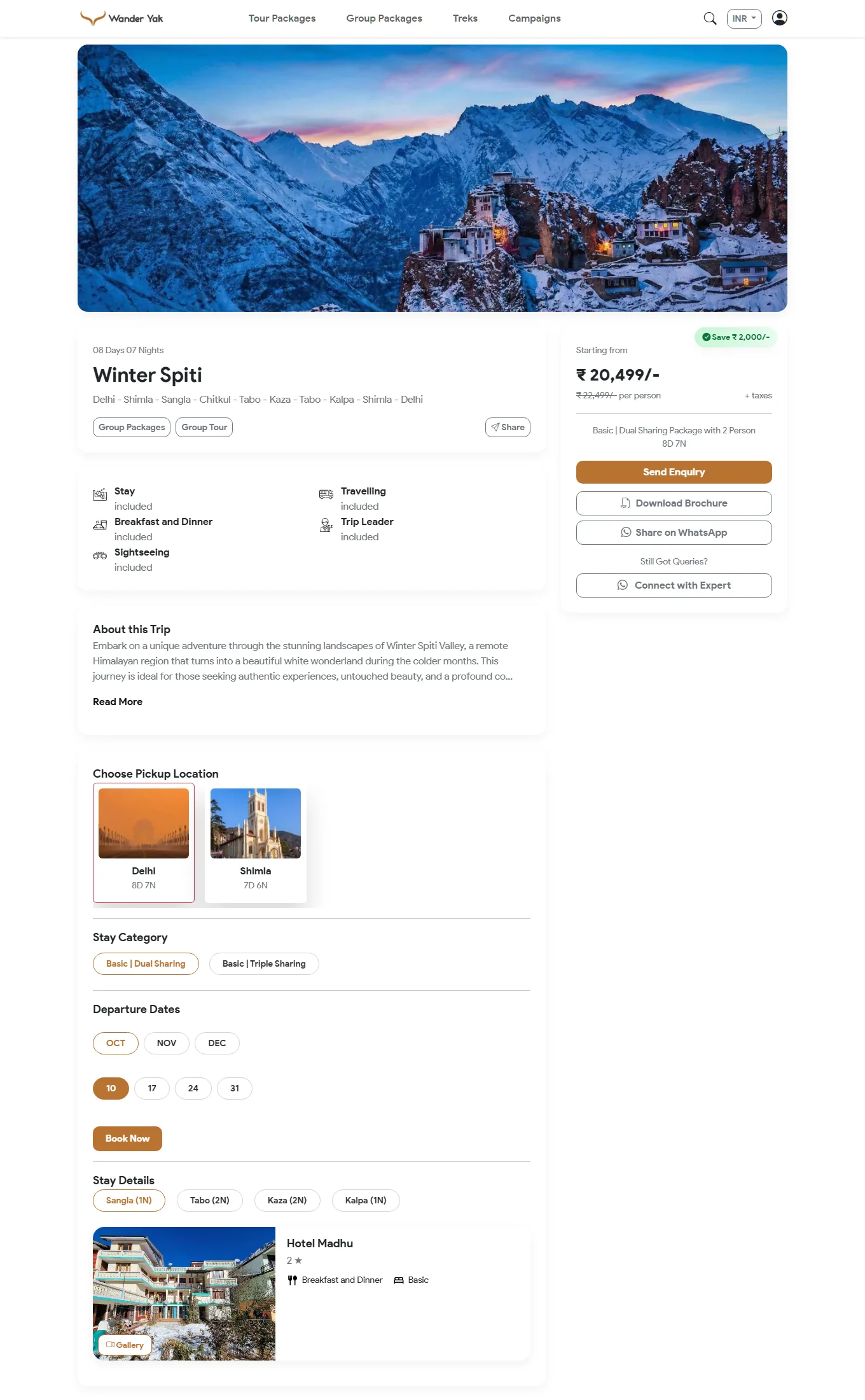
What's on it
Built so the question gets answered before it's asked.
- The price, with the saving, per person, shown for the option you've picked.
- What's included at a glance: stay, meals, travel, sightseeing, trip leader.
- Pickup city choices, each with its own duration.
- Stay categories and package options, such as dual or triple sharing.
- Departure dates by month and day.
- Stay details by night, with the hotel, its star rating, meals and a photo gallery.
- A day-by-day itinerary, inclusions and exclusions, FAQs and nearby attractions.
- Send enquiry, download the brochure, share on WhatsApp or talk to an expert, in a sticky bar on phones.
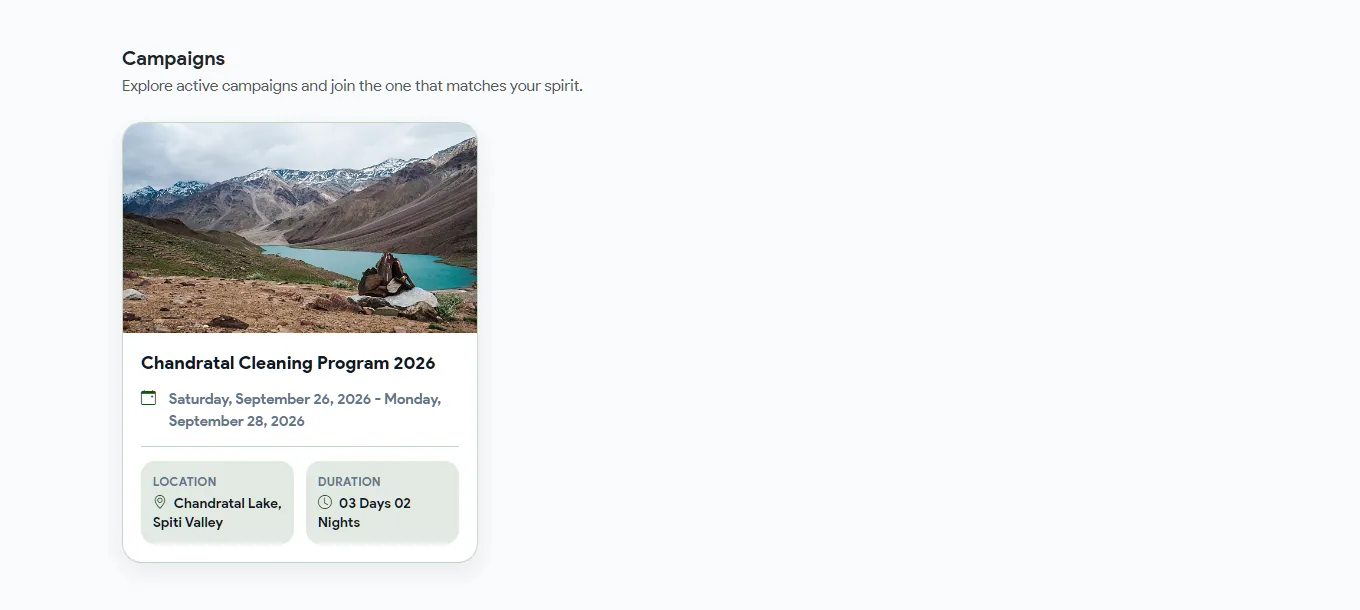
Campaigns
Volunteer-style trips with their own flow.
- A separate section for campaigns, such as a lake clean-up, with dates, place and duration.
- Registration with a media-consent and a declaration the person must accept.
- An optional entry fee. Razorpay is used, and the signature checked, only when a campaign has one.
- People can cancel their own registration, and the operator sees every registration in the admin.
Every feature
Everything the platform does.
For the traveler
- Destinations strip and pages, a trending list and a search.
- Tour packages and group packages listed separately.
- Campaigns, blogs and attraction pages.
- Accounts: sign up, verify the email, sign in and reset a password.
- Newsletter sign-up and an enquiry form with clear success and failure pages.
- Currency switch that shows prices in another currency at the day's rate.
Booking and payment
- Token payment through Razorpay, with the amounts worked out on the server.
- Group dates are checked on the server, so a date that isn't offered can't be booked.
- Payment signature verified before a booking is confirmed, and success or failure pages for each outcome.
- An account is created automatically for a new customer, with a welcome email.
- A PDF brochure for every trip, with the price in the chosen currency.
Trips and stays (admin)
- Packages with categories, a day-by-day itinerary, features, attractions and FAQs.
- Stay categories and options with their own prices.
- Hotels with features and a photo gallery per stay.
- Per-package SEO fields for title, description and address.
- Locations, attractions, sliders and menus managed as data.
Operations (admin)
- Bookings, enquiries and customers in searchable lists, one record per page.
- Campaigns and their registrations, including who paid.
- Tour sheets: an operations sheet per trip with names, adults and kids, contact, pickup and drop, vehicle and the amounts paid and remaining.
- Reviews and newsletter sign-ups.
- Email templates the operator edits, and an error log.
- Dashboard analytics for the business.
Roles and safety
- Several admin accounts with roles and permissions per section.
- A security token and a timing check on the enquiry form.
- Input filtering before anything reaches the database, and security headers.
- Pages for payment and admin are kept out of search.
Found on Google
- Clean addresses like
/package-detail/winter-spiti. - Titles, descriptions and canonical links on every page, a sitemap and an RSS feed.
- Installable as an app from the browser, with icons and a manifest.
- Compression and long caching for static files, set in the server config.
Measured on the live site
Lighthouse on mobile, 3 October 2026.
72
Performance
96
Accessibility
100
Best practices
100
SEO
One Lighthouse 13.5 run against the home page of thewanderyak.com with the mobile preset (a mid-range phone on slow mobile data, simulated).
Why performance is 72, not 90. The page makes 57 requests and weighs 3.4 MB, and its biggest photo is about 650 KB. On the test's slow connection the largest image appears at 6.6 seconds. Nothing is blocking (0 ms of blocking time) and nothing jumps around (layout shift 0.001), and the server answered in 670 ms. It's a photo-weight problem, not a code problem.
The fix is the one I built for another site, Diksha: make several sizes of each uploaded photo in modern formats and let the browser choose, and load the hero image first. Wander Yak makes one large and one thumbnail copy today. That's the next change.
What it needs
To run it.
| Server | Apache with mod_rewrite, PHP 8 and MySQL. |
| Libraries | Razorpay, Mailgun and PHPMailer through Composer, and TCPDF for brochures. |
| Front end | Bootstrap and jQuery, with server-rendered pages. |
| Services | Razorpay for payments, Mailgun or SendGrid for email, and a free exchange-rate service for the currency display. |
| Installs as | A web app on a phone's home screen (PWA). |
Being honest
What it doesn't do.
- Performance is 72 on mobile because of heavy photos, as explained above.
- It doesn't count seats. A group date stays bookable until the operator removes it.
- The token is the only online payment. The balance is settled outside the site.
- Charges are in rupees. Other currencies are for display only, from a free exchange-rate service.
- No payment webhook. A booking is confirmed when the traveler's browser returns from Razorpay, so a traveler who closes the tab at the last second needs the operator to check.
- No automated tests. It's checked by using it.
- Not a hosted service. It's licensed code that runs on the operator's own hosting.
FAQ
Questions people ask first.
What is Wander Yak?
A booking platform for tour operators. The public side shows trips, group departures and volunteer campaigns that a traveler can book and pay for online. The admin side is the panel the operator runs it all from. It is licensed to a business rather than rented as a hosted service.
What can a traveler pay for online?
To hold a seat the traveler pays a token online: 20% of the trip price, plus 5% GST on that token, through Razorpay. The balance is settled with the operator. A volunteer campaign can carry an entry fee, and Razorpay is used only when it does.
Can prices be shown in other currencies?
Yes, as a display. The visitor picks a currency and prices are converted at the day's exchange rate. The booking itself is always charged in rupees.
Does it send a brochure and confirmations?
Yes. Every trip has a PDF brochure generated on request, and booking, welcome, verification and reset emails are sent through Mailgun or SendGrid from templates the operator edits in the admin panel.
Is it fast?
Partly, and I'd rather show you the numbers: no layout shift and no blocking time, 96 for accessibility, 100 for best practices and SEO, but only 72 for performance on mobile, because the photos are big. The details and the fix are below.
Can I use the code for my own business?
Yes, under its custom licence. You can run it for your own business and modify it or have someone modify it. You can't resell, redistribute, publish or sublicense the code. Bug fixes on unmodified code are free for three months. Get in touch for terms.
Does a group trip stop selling when it's full?
Not automatically. A group trip lists its departure dates, but the platform doesn't count seats, so the operator closes a date by removing it in the admin.
Want the build story: why the token is worked out on the server, what a campaign needs that a trip doesn't, and what the speed test found?
Read the case study