
R.A.S Open source
Rider Assist System · by Shahrukh Sheikh
Python · YOLOv8 · PyQt6 · Windows · MIT licence · Version 1.0.0
Ride footage that reads like a spotter was watching it.
R.A.S looks at every frame of your motorcycle POV video, finds the cars, buses, people and animals, and draws a HUD marker on each one. The closer it looks, the louder the marker: white, then yellow, then a pulsing red. Your own audio is left exactly as it was.
Free · Open source (MIT) · Runs on your PC · Nothing is uploaded · A video tool, not a safety system
At a glance
R.A.S in numbers
3
Threat levels
White, yellow and red, chosen by how much of the frame an object fills.
7
Things it marks
Person, car, motorcycle, bus, truck, dog and cow. The list lives in a profile file you can edit.
4K
Tested resolution
The sample ride in the repository is 3840 by 2160 at 30 frames per second. There is no resolution limit in the code.
0
Videos uploaded
Everything runs on your computer. The model file is bundled, so detection works offline.
Why it exists
A helmet camera sees everything and shows you nothing in particular.
A camera strapped to a helmet records the whole ride, but a viewer can't feel which truck was close, where the bus came round the bend, or when a cow stepped onto the road. Pointing those moments out by hand, frame after frame, is hours of editing for one video.
R.A.S does the pointing for you. It's built for moto vloggers and anyone who wants a ride to look like it went through a spotter's HUD, and it's deliberately honest about what it is: a way to decorate footage you've already recorded, not a system that watches the road for you.
How it works
Six steps from raw footage to a marked-up video.
Decode
ffmpeg turns the video into raw frames, one at a time, at the original size.
Detect
YOLOv8n looks at the frame and returns a box and a name for each object, on the GPU if there is one.
Filter
Only the seven chosen kinds stay, and boxes that reach into the bike's own dashboard are dropped.
Score
The box's area, divided by the frame's area, picks white, yellow or red.
Draw
Corner brackets go on each object. Red ones pulse and glow harder, and a soft glow is blended over the frame.
Encode
The frames go straight into the encoder with your original audio copied alongside.
Threat levels
Closer looks bigger, and bigger looks louder.
R.A.S doesn't measure distance. It measures how much of the picture an object takes up, which on a fixed helmet camera is a good-enough stand-in for "how close". Two numbers in the profile decide the tier.
Red
Fills more than 7% of the frame
The thickest bracket. It pulses in width from frame to frame and gets a heavier glow around the box, so it is the first thing your eye lands on.
Yellow
Fills more than 3%, up to 7%
A medium, steady bracket. Something to notice: near enough to matter, not yet filling the view.
White
Fills 3% or less
A thin, quiet bracket for everything far off, so the road still looks full of life without shouting.
It is a size rule, not a distance reading. A big bus far away on a straight road and a small car close up can land in different tiers than you'd expect. That is fine for decoration and is exactly why R.A.S is not a safety tool.
Real frames
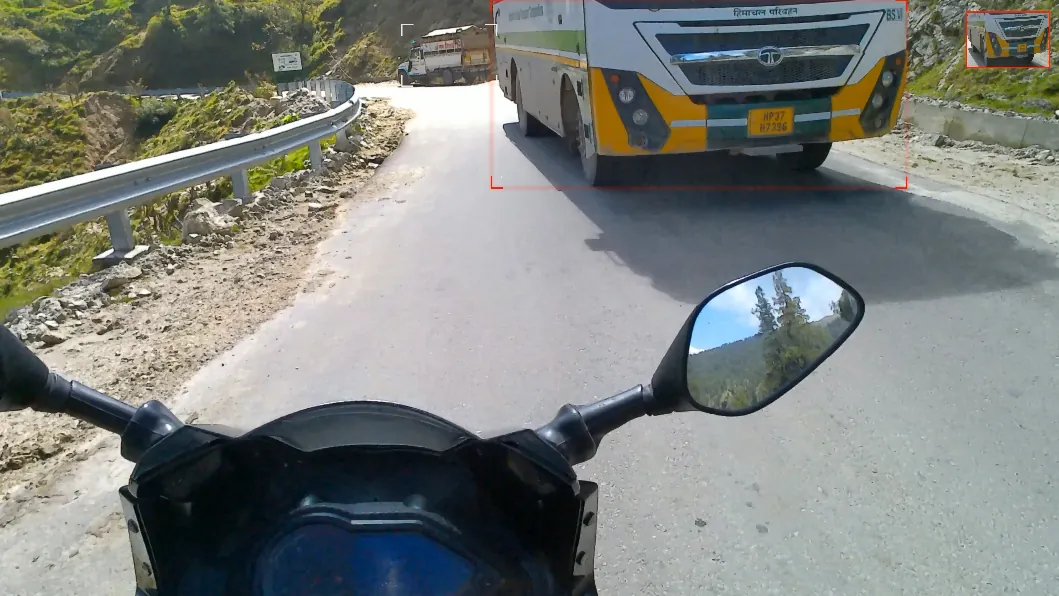
Frames from the demo ride.
These are stills from videos that R.A.S rendered from my own mountain-ride footage, taken from the project's example output. Nothing here is mocked up. The markers are drawn thin on purpose so they don't hide the road, so look at the corners of the boxes.
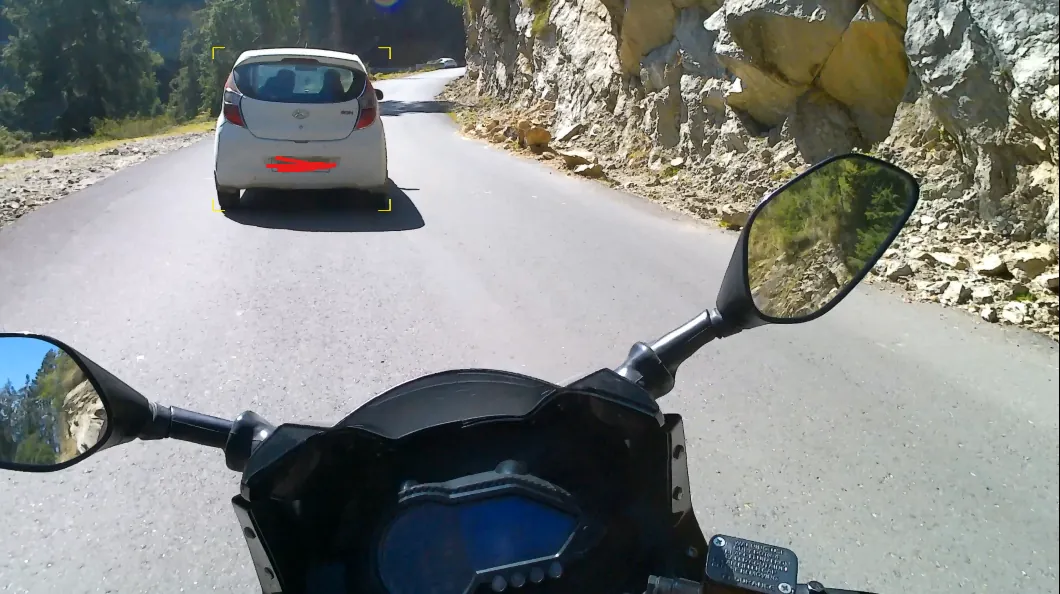
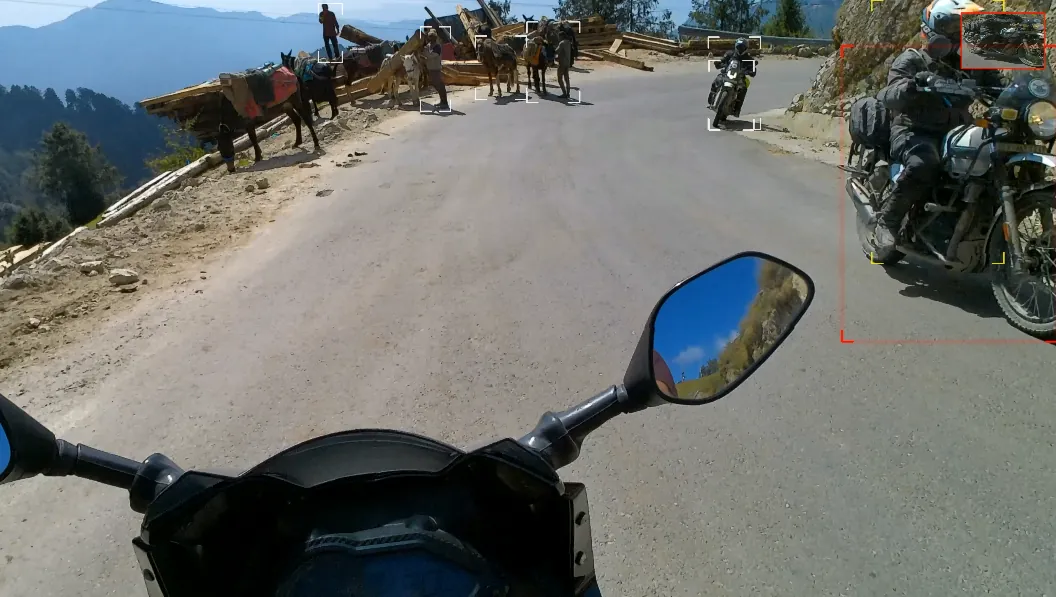
Not every frame has a marker, and that's correct: if nothing from the list is in view, or it's too small for the model to catch, the picture is left alone.
The desktop app
One window, built like a race-bike dash.
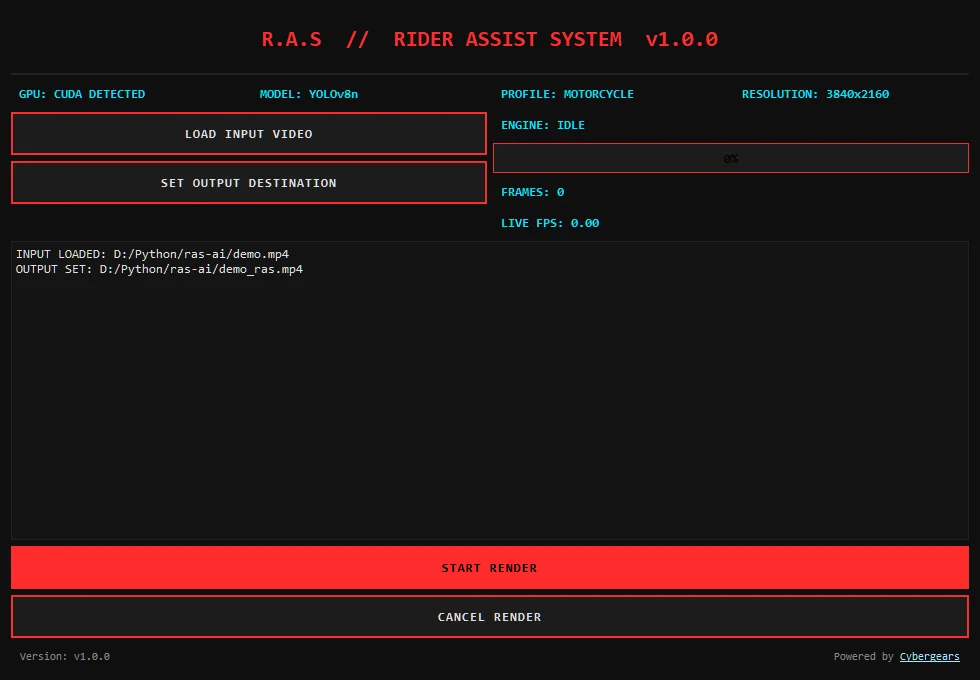
Load a video, say where the new file should go and press Start render. The window is dark with red and cyan readouts, in a monospaced font, and it tells you what the engine is doing while it works.
- Info strip: whether CUDA or the CPU is in use, the model (YOLOv8n), the profile (Motorcycle) and the resolution of the video you loaded.
- Engine status: idle, rendering, stopping, complete, cancelled or error.
- Live FPS: frames per second over the last second, plus the frame count and a progress bar.
- Cancel any time. The render stops cleanly and the status says it was cancelled.
- A log of what you loaded and where the output goes, and a clear message box if something fails.
Every feature
Everything R.A.S does.
Detection
- YOLOv8n (the small, fast model) from the Ultralytics library, with its weights file bundled.
- Every frame is checked, not a sample.
- Seven kinds of object: person, car, motorcycle, bus, truck, dog and cow.
- Dashboard ignore: a box that reaches below 70% of the frame height is skipped, so your own bike never gets marked.
- Uses the NVIDIA GPU through CUDA when PyTorch can see one, and the CPU otherwise.
Overlay
- HUD corner brackets instead of full boxes, 40 pixels long on each corner.
- Three colours: white, yellow and red, by share of the frame.
- Pulse: red brackets change thickness from frame to frame, and get a heavier glow around the box.
- Glow: a blurred copy of the markers is blended in at 15%, so they look lit rather than stamped on.
Video pipeline
- ffmpeg and ffprobe are bundled in the Windows build, so there is nothing to install.
- Streaming: frames go decoder, detector, encoder through pipes. The whole video is never held in memory.
- Hardware encoding: H.264 on an NVIDIA GPU (NVENC) when ffmpeg offers it, otherwise the CPU encoder (libx264), both at high quality.
- Audio is copied from the original without re-encoding, and the output stops with the shorter of the two streams so sound and picture stay together.
- Any size the video has: width, height and frame rate are read from the file.
Interface
- Desktop window built with PyQt6.
- Live FPS, frame count and progress while rendering.
- Cancel button that stops the render safely.
- Shows the resolution of the video you loaded and a log of what's going on.
Command line and profile
- ras_cli.py renders one video from a terminal:
--input,--outputand an optional--profile. - One JSON profile holds the object list, the red and yellow thresholds, the dashboard cut-off, the glow size and the pulse speed.
- The motorcycle profile ships with the project. Write your own for a bicycle, a car dashcam or a drone.
Trust
- Open source (MIT): every line is on GitHub.
- Local: no account, no upload, no tracking.
- Plain about its limits: the disclaimer is in the README and on this page.
Get it
Run it from source today. The Windows build is on request.
R.A.S 1.0.0
The code is public and free. A ready-made RAS.exe exists, but at about 3.4 GB it is too big for a GitHub release, so it is shared on request.
Run from source
You need Python 3.9 or newer. An NVIDIA GPU with a CUDA build of PyTorch is optional but recommended. The model weights file (yolov8n.pt) and the ffmpeg programs sit in the project folder.
Or from a terminal, for one video:
Check that your GPU is visible: python -c "import torch; print(torch.cuda.is_available())". If it prints True, detection runs on the GPU.
Use it from the window
- Press Load input video and pick your ride. The resolution appears in the info strip.
- Press Set output destination and choose where the new MP4 goes.
- Press Start render. Watch the progress bar and the live FPS.
- When the status says Engine: complete, open the new file. Your original is untouched.
System requirements
What you need.
| Windows build | Windows 10 or 11, 64-bit. About 3.4 GB for the .exe. |
| From source | Python 3.9 or newer, then pip install -r requirements.txt (ultralytics, torch, opencv-python, numpy). The desktop window also needs PyQt6. |
| Graphics card | Optional. An NVIDIA card with CUDA makes detection much faster. Without one it runs on the CPU. |
| Videos in | Anything ffmpeg can read. |
| Video out | H.264 video with the original audio copied across. |
| Internet | Not needed to run. Only to download the code or the Python packages. |
Being honest
What it doesn't do.
- It is not a safety system. It doesn't warn a rider about anything, doesn't measure distance and must not be used to make decisions on the road.
- Size, not distance. A tier comes from how much of the picture an object fills, so a big vehicle far away can look "closer" than it is.
- Seven kinds of object, chosen for a motorcycle on an Indian road. Other things, like a signboard or a bicycle, are not marked unless you edit the profile and the model knows them.
- A small model. YOLOv8n is the fast one, so it can miss objects that are small, far or partly hidden.
- One video at a time, with no batch queue, and the window always uses the motorcycle profile.
- No tracking between frames. Each frame is judged on its own, so an object sitting right on a tier line can change colour from frame to frame.
- The CPU encoder fallback is untested. R.A.S picks the NVIDIA encoder if ffmpeg lists it, and that list shows what the ffmpeg build supports, not what your PC has. I haven't tried it on a PC with no NVIDIA card.
- The frame rate is rounded down when the output is written (29.97 fps footage is written as 29), which comes from reading the code and which I haven't measured on a long clip.
- The Windows build is huge and not yet on GitHub Releases. It is not code-signed, so SmartScreen may ask you to confirm.
- Windows only. A macOS build is on the roadmap, not built.
FAQ
Questions people ask first.
Is R.A.S free, and can I see the code?
Yes to both. It is open source under the MIT licence, and the whole project is on GitHub. Use it, change it, learn from it.
Is there a download I can just double-click?
There is a Windows build, RAS.exe, but it is about 3.4 GB because it carries PyTorch with CUDA inside, so it is not on the GitHub releases page yet (GitHub caps a release file at 2 GB). Today the supported way is to run it from source. If you want the .exe, email me.
Do I need an NVIDIA graphics card?
No, but it helps a lot. When it starts, the window shows GPU: CUDA DETECTED or GPU: CPU MODE. On the CPU it runs the same model, only much slower, so a long 4K ride will take a long time.
Does it change my audio?
No. The original audio is copied into the new file as it is, with no re-encoding. Only the picture is redrawn.
Can it warn me about real hazards while I ride?
No, and please don't use it that way. R.A.S works on footage you have already recorded. It is not a collision-warning or safety system, it does not measure distance, and it only draws markers for people to look at.
Why does my frame show no markers?
R.A.S only marks seven kinds of object (person, car, motorcycle, bus, truck, dog, cow). It also ignores any box that reaches below 70% of the frame height, which is where your own handlebars and dashboard sit, and the small YOLOv8n model can miss things that are far away. A clear road with nothing near is a clear frame.
Can I change the colours, thresholds or objects?
Yes, in profiles/motorcycle.json: the list of objects, the red and yellow thresholds, the dashboard cut-off, the glow size and the pulse speed. The command-line version can load any profile file with --profile. The desktop window always loads the motorcycle profile.
Can it process many videos at once?
No. It renders one video at a time, from the window or from the command line.
Roadmap
What is done, and what is only an idea.
1.0.0 February 2026 · current
- Detection engine and command-line tool.
- PyQt6 desktop window with live FPS and cancel.
- Threat tiers, pulse and glow overlays.
- Original audio preserved, GPU encoding with a CPU fallback.
- Standalone Windows build with ffmpeg and the model inside.
Ideas, not built yet Roadmap
- A preset system and a racing profile pack.
- Lean-angle detection and a motion-based telemetry overlay.
- A real-time live camera mode.
- A macOS build.
Want the build story: why the threat level is a size rule, how the video is streamed through ffmpeg without filling memory, and what the frame-rate line in the code does?
Read the case study